- The headline list: answer 24/7, qualify by service and ZIP, book live, send SMS, write to CRM, handle simultaneous calls, transfer to a human, classify intent, take messages, run reminders, and route by service area.
- What's solved: the front-desk operational layer. Missed calls, after-hours leakage, slow data capture, double-booking, and "she's at lunch" all go away.
- Where humans still win: high-empathy crisis calls, multi-stop dispatch judgment, payment disputes, and the relational equity your office manager has built with repeat customers.
- What the gap costs: not much, if you wire the escalation paths correctly. A well-built deployment hands off to a person when the AI is out of its depth, instead of guessing. DFS runs Sara with that pattern by default.
What can an AI receptionist actually do in production? Short answer: a lot. A modern AI receptionist answers your phone 24/7, qualifies the caller by service type and ZIP, books the appointment, sends an SMS confirmation, writes the contact and notes into your CRM, and transfers to a human when the conversation goes off-script. What it cannot do is offer real empathy in a crisis, run multi-stop dispatch logic, resolve payment disputes that need judgment, or replace the relational bond a returning customer has with the human who has answered your phone for the past five years.
This post is the honest capability list. 12 things AI receptionists do well in production, 4 things they still cannot do, and what the gap actually costs you. If you want the deeper walkthrough on scheduling specifically, see our pillar on how AI receptionists schedule appointments. Most of what follows comes from running Sara, the AI receptionist Digital Footprint Solutions deploys for HVAC, plumbing, restoration, pest control, and professional service businesses.
What can an AI receptionist do?
The 12-item list below is what a production-grade AI receptionist handles today, not what a slide deck claims. Every one of these is something Sara does on live calls every day for paying clients.
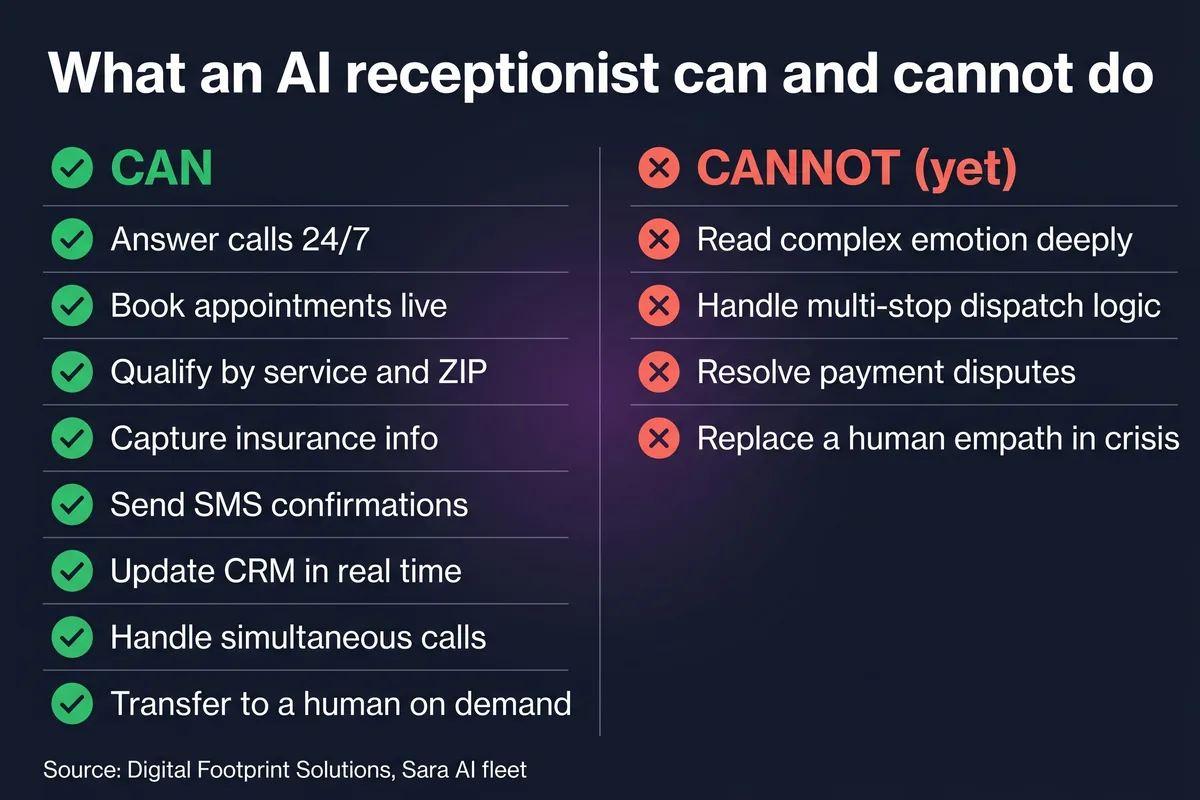
- Answer calls 24/7. Picks up inside three rings, every hour of every day, no overtime, no sick days, no "we're closed for the holiday."
- Book appointments live. Checks the calendar in real time, offers two or three slots, writes the appointment into the CRM before the caller hangs up.
- Qualify by service type and ZIP. Filters out leads that are outside your service area or outside your scope (you do residential HVAC, the caller wants commercial refrigeration), so you don't waste a slot.
- Capture insurance details. For restoration intake especially, the AI captures carrier, claim number, deductible, and policyholder name without missing a field.
- Send SMS confirmations. Fires a confirmation text seconds after the call ends, with the address, time, technician, and a reschedule link.
- Write to CRM in real time. Contact record, opportunity, notes, tags, and appointment all land in GoHighLevel (or your CRM of choice) while the caller is still on the line.
- Handle simultaneous calls. If 12 people call at once during a heatwave, the AI answers all 12. There is no queue, no hold music, no "all our agents are busy."
- Transfer to a human. When the caller asks for a person, gets agitated, or hits a topic the AI was not configured for, it warm-transfers the call with the captured context so the human picks up already in the loop.
- Classify call intent. Within the first 10 to 15 seconds, the AI tags the call as new appointment, reschedule, quote request, emergency, complaint, or general question, and routes accordingly.
- Take messages. If the caller is not ready to book, the AI takes a structured message (name, callback number, reason for the call, urgency) and writes it to your CRM with an alert to the right person.
- Run reminder sequences. Day-before reminders, day-of reminders, post-job follow-up requests, review asks, all triggered off the CRM record the AI created on the original call.
- Route by service area. Multi-location operators can route Tampa calls to the Tampa dispatcher, Orlando to Orlando, with caller-ID, ZIP, or spoken city as the routing key.
If you are doing the math on whether this stack pays for itself, see the cost breakdown in how much an AI receptionist costs in 2026. The short version: anything under three captured jobs per month and it pays for itself, every month.
What can it NOT do (yet)?
Here is where honest scoping matters. There are 4 things AI receptionists genuinely cannot do well in 2026, and a serious deployment plans for them instead of pretending. If anyone is selling you on an AI that does all of these flawlessly, you are being sold a slide deck.
1. Deep emotional support in a crisis
A homeowner whose basement just flooded at 2am does not want a chipper voice walking them through a service catalog. They want to feel heard by a human. The AI can capture the intake (address, water source, insurance carrier), confirm a technician is en route, and stay calm, but it cannot offer the kind of real empathy that defuses the worst moment of someone's week. For those calls, a well-built setup transfers to a human dispatcher inside 15 seconds and lets the AI do the data capture in the background.
2. Multi-stop dispatch logic
"Can you fit me in between the Henderson job in Plantation and the Garcia install in Davie?" That is real dispatcher work, balancing drive time, crew composition, truck stock, technician skill, and weather across a moving board. The AI can book a single appointment cleanly. It cannot rebuild your day around a new urgent job the way a human dispatcher does. The right pattern is to let the AI book, and let the dispatcher reshuffle.
3. Payment dispute resolution
If a customer calls about a charge they say should not be on their invoice, the AI should not be making judgment calls about whether to issue a credit. That is policy work, sometimes legal work, and the answer depends on context the AI does not have. Sara transfers payment disputes to the office manager, every time, no exceptions.
4. Replacing the human relationship with repeat customers
If your office manager has answered the phone for ten years and your customers know her name, that is a moat. The AI is not going to replace it, and shouldn't try. The right pattern: AI handles the overflow, the after-hours, and the new leads; your human handles the repeat customers who ask for her by name. You get capacity without losing the relationship.
For the full list of failure modes and what they cost in real revenue, see the real limitations of AI receptionists.
What's the difference between an AI receptionist and a chatbot?
Different category, but the confusion is fair because both are AI and both involve customers. Here is the operational distinction:
- Chatbots wait. AI receptionists call back. A chatbot sits on your website hoping someone types into it. An AI receptionist is on the phone the second the call comes in, on the channel home service customers actually use.
- Chatbots send forms. AI receptionists book directly. A chatbot's job is usually to capture an email and a phone number, then hand the lead to a human to call back. An AI receptionist books the appointment in the same conversation, with no callback step.
- Chatbots dump leads. AI receptionists transfer with context. When a chatbot escalates, your team gets a Slack ping and a chat transcript. When an AI receptionist transfers, the human picks up the live call with the caller still on the line and the CRM record already pulled up.
For a deeper compare, see AI receptionist vs virtual receptionist, which covers the human virtual-receptionist alternative too.
How does it adapt to different industries?
Mechanics are the same. Qualification questions, slot rules, validators, and dispatch logic change a lot by trade. A few examples:
- HVAC: service-type routing (install vs repair vs maintenance), peak-season overflow into Saturday slots, ServiceTitan sync for dispatch, emergency tag for no-heat and no-AC calls.
- Water and fire restoration: insurance carrier capture on intake, immediate technician dispatch for Category 2 and 3 losses, no booking required for active losses (just a tech en route), CAT-event surge handling.
- Pest control: service-type routing (general pest, termite, rodent, mosquito), recurring plan enrollment, ZIP-code service-area filtering, seasonal upsell prompts.
- Plumbing: emergency-vs-scheduled triage, after-hours premium booking, address verification because plumbers cannot show up at the wrong unit number.
- Professional services: consultation booking with intake questions, document collection via SMS link, calendar tied to a specific advisor instead of a round-robin.
Can it learn over time?
Here's the honest answer: not in the sci-fi sense. An AI receptionist does not silently get smarter while you sleep. What it does do is improve through three concrete loops that a serious operator runs every week.
Prompt tuning. When a recurring failure mode shows up in transcripts (callers consistently mis-saying a service name, the AI fumbling a specific objection), the prompt gets updated. This is the fastest loop and the one most operators ignore.
Validator updates. Server-side validators catch the stuff the AI's transcript gets wrong (1-900 phone numbers, ZIPs outside the service area, slot collisions, addresses that don't exist). Every new failure mode in production becomes a new validator. The prompt is the polite default; validators are the contract.
Real-call review. The owner or office manager reviews a sample of calls each week, flags anything off, and the team updates prompts or validators in response. This is where most of the real improvement comes from. The system is only as smart as the feedback loop you run on it.
If you are spinning one up from scratch, the workflow is in how to set up an AI receptionist for your home service business.
Common questions about AI receptionist capabilities
What can an AI receptionist do?
An AI receptionist answers calls 24/7, qualifies callers by service type and ZIP code, books appointments directly into your CRM, sends SMS confirmations, writes notes and contact records in real time, handles multiple simultaneous calls, classifies call intent, takes messages, runs reminder sequences, and transfers to a human when needed. In production it does everything a junior front-desk hire does on day 90, on day one.
What can't an AI receptionist do?
It cannot offer real emotional support in a crisis, run multi-stop dispatch logic across crews and trucks, resolve payment disputes that require judgment, or replace the relational bond a returning customer has with your office manager. For each of those, a serious deployment escalates to a human instead of pretending.
Can an AI receptionist book appointments?
Yes. It checks your calendar in real time, offers two or three concrete slots, books the one the caller picks, writes the appointment into your CRM, and fires an SMS confirmation before the call ends. The full exchange usually runs 60 to 120 seconds.
Is an AI receptionist better than a chatbot?
Different category. A chatbot waits passively for someone to type. An AI receptionist answers a live phone call, qualifies the lead by voice, and books the appointment in the same conversation. Most home service callers will not fill out a web form at 9pm, but they will call the number, so a voice receptionist captures revenue that a chatbot never sees.
Can an AI receptionist handle emergencies?
It can triage the intake (capture the address, the nature of the loss, insurance details, callback number) and route the call to a human dispatcher or your on-call technician within seconds. It should not be the only line of defense in a true crisis, and a well-built setup never pretends otherwise.
See it do the work, book a demo
15 minutes. We pick up the phone, you watch Sara qualify a caller and book an appointment into a real CRM in real time. No slide deck, no hypotheticals.
Book a 15-min demo →
