- Yes. Modern AI receptionists book appointments in real time, directly into your CRM or calendar, while the caller is still on the line.
- The good ones handle service-type routing, ZIP-code qualification, dispatch windows, and SMS confirmation automatically.
- Where most fail: complex reschedules, multi-stop jobs, and conversations that need empathy. The right setup hands those off to a human dispatcher.
- DFS runs Sara, an AI receptionist purpose-built for home service contractors. She has booked thousands of appointments live for HVAC, pest control, restoration, and professional service businesses.
Yes, AI receptionists can schedule appointments, and the good ones do it in under 90 seconds without ever putting the caller on hold. The real question is how well they do it for your specific business, what happens when something goes off-script, and whether the caller hangs up feeling like they spoke with a competent professional or got handed to a chatbot.
This post walks through how an AI receptionist actually books an appointment, from the caller's first hello to the SMS confirmation, where the technology shines, where it still struggles, and what to look for if you are shopping. Most of what follows comes from running Sara, the AI receptionist Digital Footprint Solutions deploys for HVAC, plumbing, restoration, pest control, and professional service businesses.
How does an AI receptionist actually book an appointment?
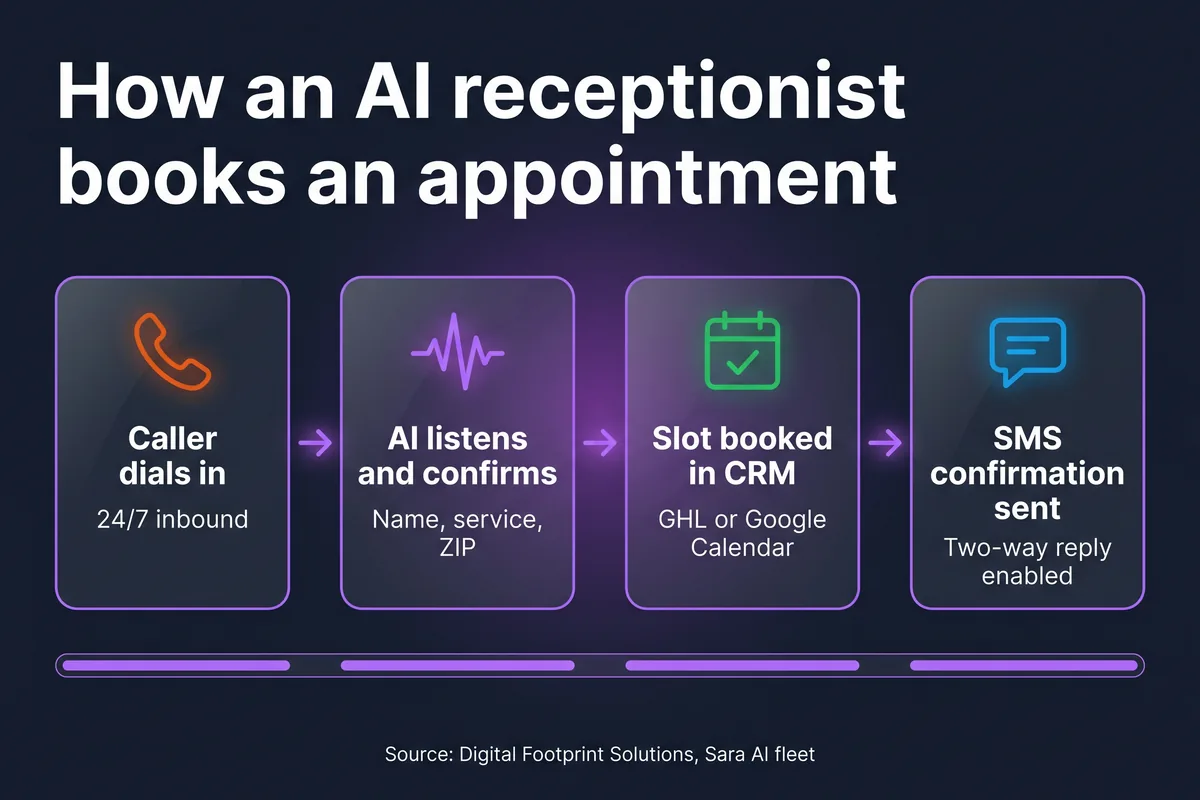
The booking flow looks simple from the outside (caller dials in, AI books, hangs up) but a production-grade AI receptionist runs through four distinct stages in the background. Skip any of them and you end up with double-bookings, no-shows, or callers who feel like they were processed by a phone tree.
Stage 1: Answer and identify intent
The AI picks up inside three rings, greets with the business name in the owner's chosen tone, and asks an open-ended question. Within the first 10 to 15 seconds it has classified the call into one of a handful of intents: new appointment, reschedule, cancel, quote, emergency, or general question. Everything that happens next is shaped by that classification.
Stage 2: Qualify and capture details
For a new appointment, the AI asks for the details your dispatcher would ask for: caller name, callback number, service type, service address or ZIP, and any context (is this a new system install or a repair, is there standing water, is the unit running). This is also where the AI quietly disqualifies leads that are out of service area or outside your scope, instead of wasting a slot on a job you cannot do.
Stage 3: Check live availability and offer slots
The AI queries your calendar or CRM in real time and offers two or three concrete options ("I have Wednesday morning at 9 or Thursday afternoon at 2, which works better for you?"). On Sara, we pre-warm the next 5 business days at call connect, so this lookup is instant and the caller never hears a pause.
Stage 4: Book, write back, and confirm
Once the caller picks a slot, the AI books the appointment directly in your CRM, fires an SMS confirmation to the caller, and on most setups also pings the dispatcher or technician via Slack, email, or push notification. The whole exchange averages between 60 and 120 seconds.
Which calendars and CRMs can an AI receptionist integrate with?
Anything with a public booking API is fair game. The integrations Sara and most modern AI receptionists ship with by default:
- GoHighLevel (GHL): the default for most DFS deployments. Two-way sync on contacts, appointments, opportunities, and pipelines.
- Google Calendar: mirror appointments into a shared calendar so your team sees them in Gmail and on their phones.
- ServiceTitan, Jobber, HouseCallPro: field service platforms with native APIs. Appointments push directly into the dispatch board.
- Acuity, Calendly, SimplyBook: common for professional services, coaching, and consulting.
- Microsoft 365 / Outlook: common for back-office and B2B booking.
If the system you use is not on this list, ask the question another way: does it have a REST API? If yes, an AI receptionist can write to it.
Is the customer experience the same as talking to a human receptionist?
Honestly? In most cases yes, sometimes better, occasionally worse.
Where AI matches or beats a human: answer speed (a human takes 30 to 90 seconds to pick up; the AI takes under three rings), 24/7 availability with no markup for nights and weekends, no hold music, no being put on hold, perfect data capture every time, and the patience to repeat itself politely if a caller asks for the address back.
Where a human still wins: high-empathy moments (a homeowner whose basement just flooded does not want a chipper voice walking them through service options; they want to feel heard), complex multi-job conversations, and edge cases that need real-time judgment. For those, a well-built AI escalates instead of pretending.
One thing most callers do not realize: they often cannot tell. Modern voice quality (we run on Gemini Live 3.1 Flash) is conversational enough that callers ask "are you the new girl in the office?" more often than they ask "is this a robot?" Some businesses disclose openly, others do not. Both work.
When does an AI receptionist hand off to a human?
This is the question that separates a serious AI receptionist deployment from a chatbot wearing a phone. The right setup defines clear escalation triggers and routes those calls to a human, not a fake fallback. Sara hands off when:
- The caller asks for a person ("can I just talk to someone").
- The caller is agitated, crying, or distressed (we use a sentiment classifier).
- The conversation hits a topic the AI was not configured for (legal questions, payment disputes, contract terms).
- An emergency requires dispatcher judgment (Category 3 water loss, gas smell, fire damage).
- The same caller calls back within an hour after a previous booking ended without resolution.
If you want the full list of where the technology still struggles, see our breakdown of the real limitations of AI receptionists.
What does AI scheduling look like for different industries?
The mechanics are the same; the qualification questions, slot rules, and dispatch logic change a lot.
- HVAC: service type routing (install vs. repair vs. maintenance), peak-season overflow into Saturday slots, ServiceTitan sync for dispatch.
- Plumbing: emergency-vs-scheduled triage, after-hours premium booking, address verification because plumbers cannot show up at the wrong unit.
- Restoration: insurance carrier capture on intake, immediate dispatch for active water losses, no booking required for emergency arrivals (just a technician en route).
- Pest control: service type routing (general pest, termite, rodent, mosquito), recurring plan enrollment, ZIP-code service area filtering.
- Professional services: consultation booking with intake questions, document collection via SMS link, calendar tied to a specific advisor.
For a deeper comparison of capabilities and gaps across these setups, see what an AI receptionist can (and cannot) actually do and the cost breakdown in how much an AI receptionist costs in 2026.
How accurate is AI appointment booking?
With server-side validators (phone normalization, ZIP allowlists, slot existence checks, service-area filters, booking-inflight deduplication), AI receptionists book correctly more than 95 percent of the time. Errors mostly come from caller mishearing or background noise, not from the AI's logic.
The trick is layering validators on the server side instead of trusting the AI's transcript. If the AI hears "Pamela" and the contact is "Pamella," a good system tokenizes and re-searches so the appointment still attaches to the right record. If the AI hallucinates a phone number with a 1-900 prefix, a validator rejects it before it ever hits the CRM. These are the kinds of details that turn a 70-percent-accurate prototype into a 95-percent-accurate production system.
What about reschedules, cancellations, and no-shows?
A modern AI receptionist handles all three. Reschedules use the same calendar lookup as the original booking; the caller picks a new slot and the AI updates the record. Cancellations remove the slot and trigger any downstream automation you have set up (refunds, win-back sequences, dispatcher notification).
For no-shows, the AI itself does not chase the customer (that is a job for SMS workflows or a follow-up call from a human), but it logs the no-show in your CRM the moment the dispatcher marks it, which feeds your retention and re-engagement automations.
Common questions about AI receptionists and scheduling
Can an AI receptionist actually book appointments live on the phone?
Yes. A modern AI receptionist checks calendar availability, holds a slot, and writes the appointment into your CRM while the caller is still on the line. The caller hears confirmation in the same call, usually inside 60 to 90 seconds, and gets an SMS confirmation seconds after hanging up.
Which calendars and CRMs can an AI receptionist integrate with?
Most production AI receptionists write to GoHighLevel, Google Calendar, Microsoft 365, ServiceTitan, Jobber, HouseCallPro, and Acuity. Anything with a public booking API can be wired in. DFS's Sara is built on GoHighLevel v2 by default and can mirror appointments into Google Calendar in real time.
What happens if the caller wants to reschedule or cancel?
A well-built AI receptionist can reschedule and cancel using the same calendar lookup it uses to book. For complex changes that involve multiple jobs, partial credits, or angry customers, the AI hands the call to a human dispatcher instead of guessing.
How accurate is AI appointment booking?
When set up with server-side validators for phone numbers, ZIP codes, and slot availability, AI receptionists book correctly more than 95 percent of the time. Errors mostly come from caller mishearing or background noise, not from the AI logic itself.
Will the customer know they are talking to an AI?
Most callers do not realize it until you tell them. The voice quality on modern AI receptionists is conversational, with natural pauses and back-channeling. Some businesses disclose it openly. Either choice works, as long as the experience is professional and the appointment actually shows up on the calendar.
See Sara book a live appointment
15 minutes. We pick up the phone, you watch Sara book an appointment into a real CRM in real time. No slide deck, no fluff.
Book a 15-min demo →
