- Yes, there are real limits. AI receptionists are useful and shipping in production every day, but they are not magic and they are not a one-for-one human replacement.
- The five categories that matter: deep empathy and crisis response, complex multi-job dispatch, off-scope conversations, voice fidelity on bad connections, and judgment calls that need context outside the system.
- Good systems do not pretend the gaps do not exist. They engineer around them with server-side validators, escalation triggers, sentiment classifiers, and scheduled human callbacks.
- For most home service contractors the right answer is AI plus a human dispatcher, not AI alone. See how scheduling actually works for the upside, then read on for the honest limits.
The honest list of AI receptionist limitations is short, real, and worth knowing before you sign anything. AI receptionists are real, they are useful, and they are answering hundreds of calls a day across our deployments at Digital Footprint Solutions. They are also not magic. The companies that ship them best are the ones honest about the gaps, because that honesty is what makes the system trustworthy in production. If a vendor tells you their AI handles 100 percent of calls perfectly, walk away. Nobody who runs this technology in the wild believes that.
What follows is the unvarnished list of where AI receptionists still struggle, drawn from running Sara on DFS's own number and across our client fleet. None of these limits should disqualify the technology. All of them should shape how you deploy it. If you want the upside first, the pillar post on whether AI receptionists can actually schedule appointments covers what they do well. This is the trust-building counterweight.
Limit 1: Deep empathy and crisis response
An AI receptionist can be polite, steady, and patient. It cannot replace the relational depth of a 20-year dispatcher who has heard every kind of emergency and knows, instinctively, when to slow down and when to dispatch immediately. When a homeowner is in tears because their basement is filling with sewage at 2am, the right response is not a confident voice walking through service options. It is a calm human who knows the foreman by name and can promise a truck inside the hour.
Sara can capture the intake (name, address, type of loss, callback number) in under 90 seconds and route it to the on-call dispatcher. What she cannot do is be the person on the other end of a bad day. A well-built AI deployment does not try. It hears distress, books the intake, and gets a human on the line as fast as possible.
This is the part of the job that earns brand loyalty in restoration and plumbing. Treat it as sacred. Use the AI to capture the data so the human is free to be human.
Limit 2: Complex multi-stop or multi-job dispatch logic
A single appointment? AI nails it. Three-stop service routes, partial credits across two invoices, mid-job changes when the technician is already on site? That is where AI hits its ceiling fast.
The problem is not the AI's reasoning. It is the combinatorial mess of dispatching software, partial billing rules, technician calendars, and customer history that lives in your dispatcher's head. Some of that lives in ServiceTitan, some lives in your dispatcher's notebook, and some only exists as a verbal arrangement with a long-term customer. No AI receptionist can reconcile all of that in a 90-second call.
What good systems do: book the simple appointments cleanly, flag the complex ones with the line "this is going to need our dispatcher, can I have him call you back inside 30 minutes," and log everything captured so the human starts with context, not a blank screen. See what an AI receptionist can and cannot actually do for the longer capability breakdown.
Limit 3: Open-ended conversations beyond the configured scope
AI receptionists are scoped tools. They are configured to handle a defined set of intents (book, reschedule, quote request, intake, message) and a defined business context (your services, your service area, your pricing posture). The moment a conversation walks outside that scope, the AI has to make a choice: improvise, or hand off.
Improvising is how you end up with the AI promising a refund the business never authorized, or quoting a legal interpretation of a service contract, or answering a payment dispute it has no visibility into. None of those endings are good.
The fix is prompt scope discipline plus server-side enforcement. The AI is told, in the system prompt and in the tool descriptions, exactly which conversations belong to it. When the caller raises a topic outside that list (legal questions, billing disputes, contract interpretation, anything involving an attorney or a payment processor), the AI says some version of "that's a great question for our office, let me have someone call you back today" and books a callback. It never improvises. The contract here is built on validators, not the AI's good intentions.
Limit 4: Voice fidelity on noisy or low-quality connections
Phone audio is narrowband. Add a noisy roofing job site, a weak cell signal in a basement, a heavy accent the model has not been tuned for, or a caller using a Bluetooth headset in a car at 70 mph, and the speech-to-text layer starts dropping syllables and misspelling names.
This is not unique to AI. Human receptionists deal with it too, which is why they ask callers to repeat themselves and spell names. The difference is that humans handle it gracefully and AI sometimes does not. We have caught the model hearing "Pamela" when the caller said "Pamella," writing a 1-900 phone number when the caller said something the model could not parse, and confidently writing back a name with one wrong letter. None of these are dealbreakers, but all of them require defensive engineering.
What good systems do: phonetic readback on every email and address ("R as in Romeo, A as in Apple"), tokenized name search instead of exact-match against the CRM, phone-number validators that reject obvious hallucinations (1-900 prefixes, all-zeros, premium ranges), Krisp BVC noise cancellation upstream of the voice model, and a stuck-session watchdog that ends the call cleanly when the model gets confused instead of looping. Sara ships with all of these.
Limit 5: Judgment calls that need context outside the system
Some calls require knowing things the AI cannot see. The caller is the cousin of your biggest commercial client and you have a standing rule to comp the trip fee. The technician on Tuesday is going through a divorce and the dispatcher has been quietly routing the difficult calls to someone else this week. The customer in the system has a flag from 2019 that says "do not send John, they had a falling out." All of this lives in human memory and human relationships, not in the CRM.
An AI receptionist will follow the rules you give it. It will not invent the rules you forgot to write down. If those unwritten rules matter (and in family-run businesses they almost always do), the AI's role is to capture the appointment cleanly and let the human dispatcher do the routing.
The lesson: AI is best at the parts of the job that are explicit, repeatable, and rule-driven. Booking, intake, qualification, confirmation. Anything that requires reading the room? That is still human work, and probably always will be.
How good AI receptionist systems engineer around these limits
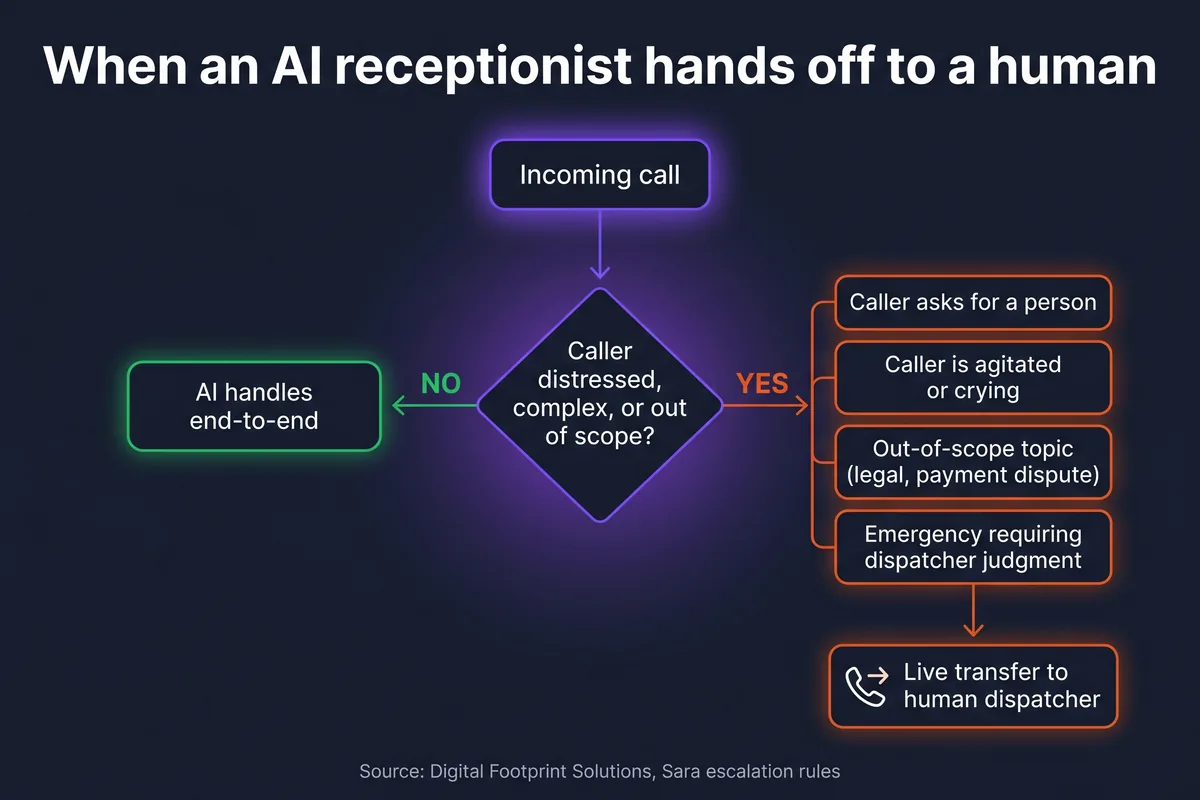
The infographic above is the abbreviated version. Here is the longer one. Every one of the five limits has a corresponding engineering pattern, and a serious vendor should be able to walk you through each.
- Server-side validators catch hallucinations before they hit your CRM. Phone normalization, ZIP allowlists, service-type allowlists, address validation, slot existence checks, booking-inflight deduplication. The contract is built on the validators. The prompt is the polite default.
- Sentiment classifiers watch for distress and trigger handoff. If the caller is crying, agitated, or using emergency keywords, the AI escalates immediately instead of completing the booking flow.
- Escalation triggers are explicit and configurable. Caller asks for a person, topic outside scope, emergency keyword fires, same caller calls back within an hour of an unresolved call. Each one routes the call to the right human.
- Scheduled human callbacks are a first-class outcome, not a fallback. The AI books the callback into the dispatcher's calendar like any other appointment and the customer gets an SMS confirmation. This is how you handle the calls the AI should not try to close.
- Prompt scope discipline keeps the AI inside its lane. Hard constraints (must, never) live in the tool descriptions and the server-side validator layer. After three failed prompt iterations on the same bug, escalate the rule into code. Prompts are not contracts.
- Stuck-session watchdog ends the call cleanly when the model gets confused. Better to hand off than to spiral.
None of these are cutting-edge. All of them are missing from most AI receptionist deployments we audit. The difference between a 70-percent-accurate prototype and a 95-percent-accurate production system lives in this layer. For the full setup walkthrough, see how to set up an AI receptionist for your business.
When you should NOT use an AI receptionist
Three cases where the right answer is to not deploy AI at all.
Lowest-volume single-owner shops where the owner's voice is the brand. If you take five calls a day and every customer expects to hear your voice, an AI receptionist is overkill and probably hurts your differentiation. Pick up the phone yourself. The competitive advantage of being a small operator is that you can be human in ways a 50-truck shop cannot.
Ultra-high-stakes verticals. Medical emergency dispatch, suicide hotlines, anything where a wrong word costs more than a missed call. The technology is not ready for those use cases and probably will not be for years. Stay with humans, period.
Businesses with sub-five calls per day. If a human can pick up faster than the AI can answer and qualify, there is no leverage. AI receptionists are a leverage tool. They earn their cost when the volume is high enough that a human cannot match the response time, which is usually somewhere north of 10 to 15 calls a day or any non-trivial after-hours volume.
For everyone else (most HVAC, plumbing, restoration, pest control, roofing, and remodeling companies with 10+ calls a day and meaningful after-hours volume) AI receptionists pay for themselves inside the first month. The honest comparison is in AI receptionist vs virtual receptionist and the cost math is in how much an AI receptionist costs in 2026. Your specific volume profile is the deciding factor. If you run an HVAC business with peak-season overflow, the math is usually obvious. If you take three calls a week, it is probably not.
Common questions about AI receptionist limitations
What are the biggest limitations of AI receptionists?
The five real limits are deep empathy and crisis response, complex multi-stop or multi-job dispatch logic, open-ended conversations outside the configured scope, voice fidelity on noisy or low-quality phone connections, and judgment calls that require context outside the system. Good systems do not deny these gaps. They engineer around them with server-side validators, escalation triggers, sentiment classifiers, and clean human handoffs.
Can an AI receptionist handle an emergency call?
It can capture the basics of an emergency (caller name, callback number, address, type of loss) and dispatch a technician in under 90 seconds. What it should not do is try to calm a panicked homeowner, walk them through shutting off a water main, or substitute for the relational depth of a 20-year dispatcher. A well-built AI flags emergency intent and routes the call to a human as fast as it can while logging the intake details in parallel.
What happens if the AI doesn't understand what the caller said?
Two things should happen. First, the AI asks the caller to repeat or rephrase, calmly and once. Second, if it still cannot parse the input after a single retry, it hands off to a human and logs everything captured so far. The failure mode to avoid is the AI guessing and writing wrong data into the CRM. A good production setup uses server-side validators and a stuck-session watchdog to catch this before the call ends.
When should I NOT use an AI receptionist?
Three cases. First, lowest-volume single-owner shops where the owner's voice is a competitive advantage. Second, ultra-high-stakes verticals like medical emergency dispatch or suicide hotlines, where a wrong word costs more than a missed call. Third, businesses with fewer than five calls per day where a human can simply pick up faster. AI receptionists shine for businesses with call volume that exceeds what a single person can answer, especially after hours and on weekends.
How do I know when an AI receptionist will hand off to a human?
The handoff rules should be visible and adjustable in your AI receptionist configuration. The defaults that matter: caller explicitly asks for a person, sentiment classifier detects distress, topic falls outside the configured scope (legal, payment disputes, contract terms), or an emergency keyword fires. If a vendor cannot show you the handoff logic in plain English, that is a red flag.
See how Sara hands off
15 minutes. We pick up the phone, you watch Sara handle a clean booking, then watch her hand off the call you would not want her to close. No slide deck.
Book a 15-min demo →
