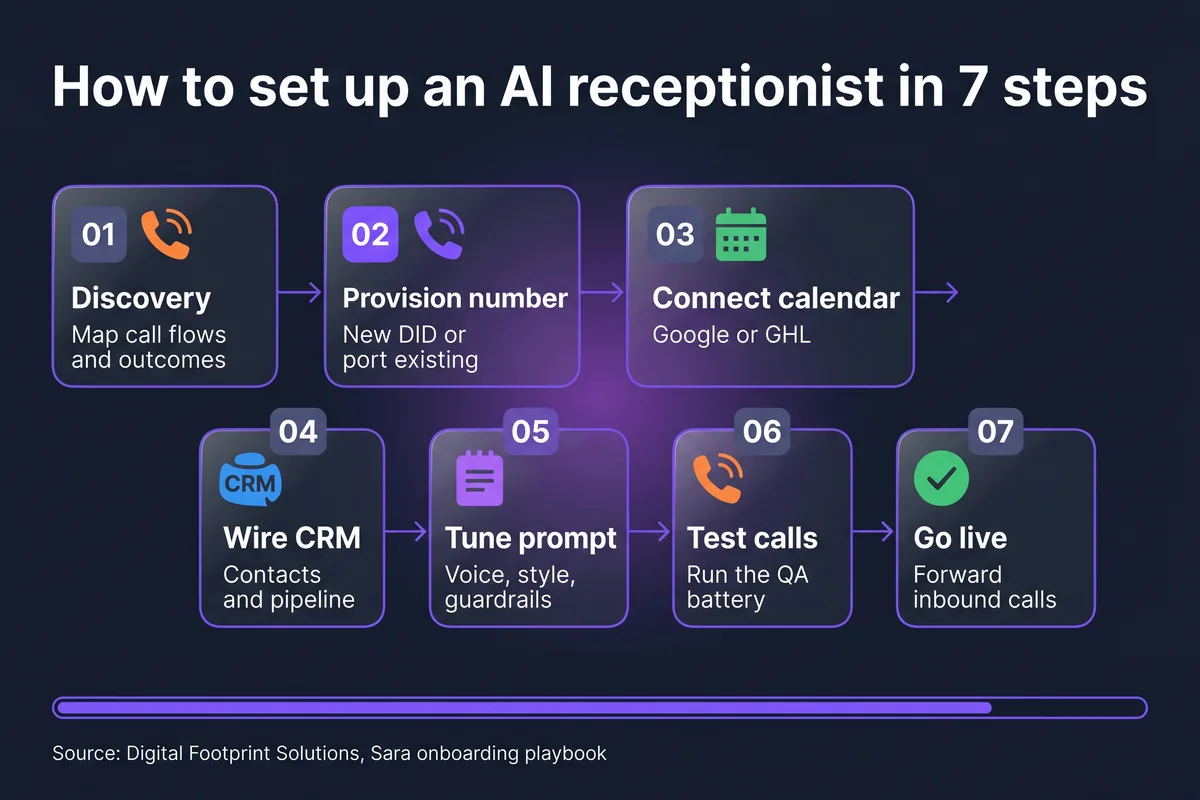
- 7 stages, about 48 hours. Discovery, phone, calendar, CRM, prompt tuning, test calls, go-live. That is the whole loop.
- What you need beforehand: a list of services with rough pricing, your service area, business hours, and access to your current phone line and calendar.
- What DFS does: phone provisioning, prompt drafting, server-side validators, integrations, the 12-call test battery. What you do: answer a 45-minute discovery call, approve the script, take three test calls.
- Setup fees are real and range $0 to $3,997+ depending on complexity. A simple single-trade deployment is light. A multi-trade restoration company with insurance carrier intake is not.
Setting up an AI receptionist is way less scary than most owners expect. There are 7 stages, the whole thing takes about 48 hours from sign-up to live calls for a standard single-trade business, and the parts that feel intimidating (phone routing, calendar sync, prompt tuning) are handled by your provider. You answer questions, approve a script, take a few test calls, then it is live.
This is the actual playbook DFS runs when we onboard a new client onto Sara, our AI receptionist for home service contractors. It covers what to map before you sign up, how the phone number gets provisioned, where calendars get wired in, how the prompt gets tuned, and what the test-call battery looks like before any real customer hits the line. If you have not read the pillar piece on how AI receptionists book appointments live, start there for the why. This piece is the how.
Step 1: Discovery, map your call flows, services, and outcomes
Before any phone number gets provisioned or any prompt gets written, you sit through a 45-minute discovery call. This is the most important step. If discovery is sloppy, every other step compounds the mistakes.
The questions to come prepared for:
- What services do you offer, and at what rough price points? The AI needs this to qualify leads and quote ballparks correctly.
- What is your service area? ZIP codes, a radius, or a list of cities. Anything outside this gets disqualified on the call instead of wasting a slot.
- What does a typical booking call sound like today? Walk through three or four recent calls from memory. This is where the AI's qualification flow gets shaped.
- What outcomes count as wins? Booked appointment, qualified lead in CRM, emergency dispatch, callback request. Different verticals weight these differently.
- What are your hard "no" rules? Things like "never quote a price over the phone" or "never book on Sundays" or "always transfer if they ask for the owner."
For most home service contractors, this is also where you decide whether the AI is the primary line or an overflow line. Both work. Primary line catches everything; overflow only kicks in when your team is on another call or after hours.
Step 2: Provision the phone number
You have two options here, and the right answer depends on how fast you want to go live.
Option A: Forward your existing number. Keep your current main line. The AI gets a brand new number. You set up call forwarding from your existing line to the new AI number, either always-on or only when you do not pick up after 4 rings. This goes live the same day. No porting, no waiting on carriers. The only catch is your business shows the new number on outbound caller-ID, which is rarely a problem for inbound receptionist work.
Option B: Port your existing number. Move your main line to the AI carrier. Cleaner long-term, no forwarding hop, no double-billing. The downside is porting takes 5 to 10 business days and your number is in limbo for a few hours during the cutover. Most contractors start with Option A so they can be live in 48 hours, then port later once they trust the system.
Under the hood, the AI number sits on a SIP trunk with STIR/SHAKEN attestation so calls do not get flagged as spam. The carrier routes incoming calls through a dispatch rule into the AI's voice runtime. You do not need to know any of this to run it; you do need to know that this step has a quiet gotcha (see the gotchas section below) where if the dispatch rule does not get updated when a new DID gets attached, the number stays offline. Easy to fix; embarrassing if you skip it.
Step 3: Connect your calendar (Google Calendar or GoHighLevel)
The AI cannot book what it cannot see. This step wires the calendar that holds your team's availability into the booking flow.
Google Calendar is the most common setup for smaller contractors. You grant OAuth access to a shared technician calendar, the AI reads availability in real time, writes appointments directly, and the appointment shows up on everyone's phone within seconds. If you use the native calendar on your phone for everything, this is the path.
GoHighLevel is the default for DFS deployments because it doubles as the CRM. One integration handles calendar, contact records, opportunities, pipelines, and SMS confirmations. The AI lookup is near-instant because we pre-warm 5 business days of slots the moment the call connects.
A few rules that come up at every onboarding:
- Service area filter: the AI checks the caller's ZIP against your service area before offering a slot. Outside the area, it offers to take a message instead.
- Buffer rules: drive time between jobs, lunch breaks, end-of-day cutoffs. The AI honors all of them if you tell it about them.
- Round-robin gotcha: if you use a round-robin calendar in GHL, the calendar does not block slots after a booking until the dispatcher accepts it. Sara would happily book the same slot twice across two calls in a row. The fix is to use a single-user calendar per technician, or pass an assignedUserId in the booking payload so each appointment is locked to one user.
Step 4: Wire your CRM
Calendar tells the AI when. CRM tells it who, what happened, and what to do next.
For DFS, the default is GoHighLevel v2. Every Sara call writes a contact record (or merges into an existing one), tags the conversation, fires the booking into the calendar, and triggers any downstream workflow (SMS confirmation, dispatcher notification, day-of reminders). For contractors already on ServiceTitan, Jobber, or HouseCallPro, the AI writes directly into those via their native APIs.
Pipeline mapping is the part most owners underestimate. You want every Sara call to land in the right pipeline stage so your reporting stays clean. A typical mapping:
- Booked appointment: moves the contact into "Appointment Booked" stage, tags with service type.
- Qualified lead, no booking: "Lead Captured" stage, fires a manual-callback task to the dispatcher.
- Out of service area: "Disqualified, OOA" stage, no downstream workflow.
- Emergency: immediate SMS to dispatcher with caller phone + situation, no pipeline change (live handoff).
If you want to see what happens after the CRM write, the breakdown of what an AI receptionist actually does covers the downstream automations in detail.
Step 5: Tune the prompt, voice, style, scope, and guardrails
The prompt is where the AI gets its personality, its rules, and its limits. For DFS deployments, we draft the first version from your discovery call inside 24 hours, then iterate with you over text for another 24.
What we tune in this step:
- Voice: we pick from a handful of options (warm, professional, friendly, energetic). Most home service contractors pick warm-professional. You can swap voices in minutes after launch if it does not feel right.
- Greeting: the first 4 seconds the caller hears. Always leads with the greeting word ("Hey," "Hi," "Hello,") not the business name jammed up front, because the latter sounds robotic.
- Service scope: what the AI can quote, what it punts to a human. Owners almost always over-scope on day one. We pull it back.
- Banned phrases: things you never want it to say. No "I understand your frustration." No "let me check on that for you." Real people do not talk like that.
- Escalation triggers: when does it transfer or take a message? Usually the explicit ask for a person, sentiment red, or specific topics like legal or refund disputes.
A note for the technically curious: modern voice models like Gemini Live 3.1 have a hard prompt ceiling around 25,000 characters before deep rules get silently truncated. That sounds like a lot, but it adds up fast once you list every service, every price range, every edge case. We keep the prompt tight and push hard rules into server-side validators where possible. Phone normalization, service allowlist, address validation, slot existence checks: those live in code, not in the prompt, because prompts are polite suggestions and validators are contracts.
Step 6: Run the test-call battery
This is the step that catches everything before a real customer ever hears the AI. Every DFS deployment runs the same 12 test calls before go-live:
- Happy path booking: caller wants an appointment, in service area, normal request. Should book inside 90 seconds.
- Qualification edge case: caller is on the fence about service type. AI should clarify, not assume.
- Address typo: caller says a street name the AI mishears. AI should confirm phonetically, not silently book a wrong address.
- ZIP outside service area: caller is in the next county. AI should disqualify politely and offer to take a message.
- Reschedule: caller had a previous booking, wants to move it. AI should find the existing appointment and update, not duplicate.
- Cancel: caller wants to cancel. AI should confirm, remove, fire the right downstream workflow.
- Emergency: water in the basement, gas smell, fire. AI should skip the booking flow and dispatch live.
- Escalation request: "Can I just talk to a person?" AI should transfer, not negotiate.
- Sentiment red: caller is upset, agitated, or crying. AI should hand off to a human, not try to soothe.
- Phone hallucination: the AI gets fed a 1-900 number or all zeros. The validator should reject before it ever hits the CRM.
- Simultaneous calls: two callers ringing at once. Both should get answered, no queue, no double-booking.
- After-hours: a call at 11pm. AI handles it the same way it handles 11am, unless you have explicit after-hours rules configured.
If any of these fail, we fix and re-test before moving forward. No exceptions. The deployments that skip the test battery are the ones that show up in the real limitations of AI receptionists piece as failure modes a month later.
Step 7: Go live
Once the test battery passes, you flip the switch. For Option A (forwarding), this is literally one toggle on your existing phone line. For Option B (port), the carrier completes the port and the AI starts taking calls within an hour of cutover.
The first 48 hours after go-live are where the real tuning happens. We monitor every call, listen to recordings (with consent flags set per your state's two-party rules), and ship prompt or validator updates the same day if anything sounds off. After the first week, the cadence drops to weekly tuning, then monthly once the system is stable. The AI is configuration, not concrete. Anything that bothers you can be fixed in hours.
How long does setup actually take?
For a standard single-trade home service business (HVAC, pest control, plumbing, restoration, roofing), 48 hours from sign-up to live calls is the realistic timeline. Day 1 is discovery, phone provisioning, calendar wiring, CRM connection, and first prompt draft. Day 2 is prompt iteration, test-call battery, and go-live.
Multi-trade businesses (a contractor running HVAC + plumbing + electrical under one number) stretch to 5 to 7 business days because the qualification logic has to cleanly route across services without confusing the AI. Restoration companies with insurance carrier intake or businesses porting an existing number can run 1 to 2 weeks because the carrier port itself takes 5 to 10 business days. Water and fire restoration deployments are the heaviest setup because the emergency dispatch rules touch live operations.
What can go wrong?
Four gotchas come up enough that they deserve their own list. Most of these we now catch automatically; they used to bite us.
- Forgotten SIP dispatch rule update: when a new phone number gets attached, the carrier needs an explicit command to wire that DID into the AI's dispatch rule. Skip it and the number rings to nothing. This is the single most common new-client onboarding miss in the industry. Always verify by calling the number from a phone that is NOT the one being configured.
- Round-robin calendar slot blocking: mentioned above. Round-robin calendars do not block a slot after a Sara booking until a dispatcher accepts. Fix is single-user calendars or passing assignedUserId. If you ignore it, you will get a double-booking inside the first week.
- Test environment voice quality: in test calls, the voice often sounds slightly different than in production because the routing path is different. Do not panic if test calls sound thinner than your demo did. Production audio over a real carrier with G.722 HD Voice or Opus is noticeably cleaner.
- Prompt drift if scope creeps: the most common 30-day issue is that owners keep adding "oh, can it also do X" until the prompt balloons past the 25,000 character ceiling and rules start silently getting ignored. Discipline yourself or let your provider push back. Less prompt, more validator. Always.
Common questions about setting up an AI receptionist
How long does it take to set up an AI receptionist?
About 48 hours from sign-up to live calls for a standard single-trade home service business. Multi-trade businesses, larger teams, or deployments that require porting an existing phone number can stretch to 1 to 2 weeks. The bottleneck is almost always carrier porting and test-call cycles, not the AI build itself.
Can an AI receptionist work with my existing phone number?
Yes. You can either port your existing number to the AI carrier (clean but takes 5 to 10 business days) or set up call forwarding from your current line to a new AI number (instant, no porting required). Most contractors start with forwarding so they can go live in 48 hours, then port later once they trust the system.
Does it integrate with Google Calendar?
Yes. Sara writes appointments into Google Calendar in real time, with the right service-area filters, buffer rules, and round-robin handling. The AI can also mirror appointments between GoHighLevel and Google Calendar so your CRM and your team's phones stay in sync.
What do I need to provide to get an AI receptionist set up?
A list of services you offer with rough pricing, your service area (ZIP codes or a radius), your business hours, your calendar or CRM credentials, and access to whoever owns your current phone line. DFS handles everything else: phone provisioning, prompt drafting, validators, integrations, and test calls.
Can I change the AI receptionist's voice or script after it's live?
Yes, and most owners do. Voice swaps take minutes. Script edits ship the same day. Larger changes like a new service line or a different qualification flow ship inside 24 to 48 hours. The AI is configuration, not concrete.
Let DFS set it up for you
Book a kickoff call. We map your services, provision the phone, wire your calendar and CRM, and run the test-call battery. Live in about 48 hours.
Book a kickoff call →
